How to replay the questions your class missed
For teachers · 2 minutes
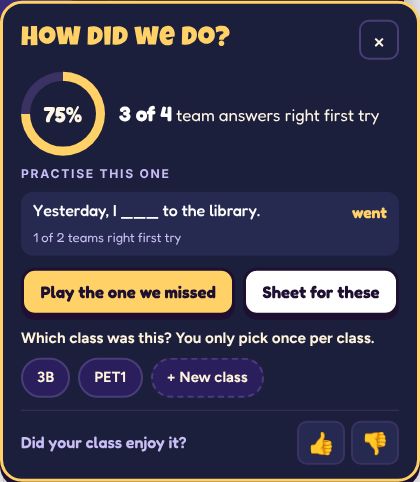
When a game ends, press Play the ones we missed on the How did we do? card for a quick second round. Signed in, Sheet for these prints a worksheet of just those questions.
Step by step
Play the ones you missed, straight away
On the How did we do? card press Play the ones we missed. Each one comes up again: say it together, then check the answer.
Print a sheet of just those
Signed in, Sheet for these opens the worksheet with only the missed questions. See how to print a worksheet.
Make next lesson's game
On the Class results page, under Needs work or in any lesson, press Make next lesson's game. Pick the questions and a game, and a new draft opens for you to check. No AI and no credit used.
If it doesn't work
The card closed before I pressed anything
It folds into a small button at the foot of the game. Tap it to open the card again.
The card didn't show
It shows on games that mark answers right or wrong. See the list in how to see how your class did.
Related
- How to see how your class did
- How to add your classes and tag a lesson
- How to print a worksheet for a game
Still stuck? Email hello@lessonvibe.com and a real person will write back.